


Lucid Lynx, Canonical's latest desktop release of Ubuntu(10.04), sports a new look and feel designed to attract new users, both in business and at home.
No doubt the launch of a music store component for the Ubuntu Onecloud service available through the Ubuntu OS will give consumers areason to consider one of the most popular Linux desktops.
Canonical, the commercial outlet of the community-developedUbuntu Linux distro, clearly wants to make migrating to Ubuntu easy for new users toexperience right out of the box. The company has partnered withseveral computer makers to preinstall the long-term support version ona range of computers this summer.
Existing Ubuntu users who have no interest in the music outlet or thesocial networking tools integrating into the desktop still have goodreasons to upgrade to version 10.04. Lotsof tinkering under the hood has produced a reliable and moreresponsive distribution.
Define Sexy
That could well be the motivating factor behind this latest Ubunturelease. The question was how to make it look as appealing as the Mac, said ChrisKenyon, vice president for OEMPartner Devices for Canonical.
"It is evident that the community did a huge amount of work to make ita polished OS. This release stands out. It runs quite deep in userexperience. Much of the social networking is more integrated, makingit sexy to use," he told LinuxInsider.
Another big change in Lucid Lynx is enhancements to the boot routineand changes to the software center that feeds more apps to Ubuntu.Boot times continued to drop over the last two years, and designers areworking to bring more software in an app store environment, explainedKenyon.
Antisocial Nature
Mine, that is, not Ubuntu's! One of my fears in upgrading to LucidLynx was the tweaking done to the social networking with the new MeMenu. I was concerned that the desktop integration would be toointrusive.
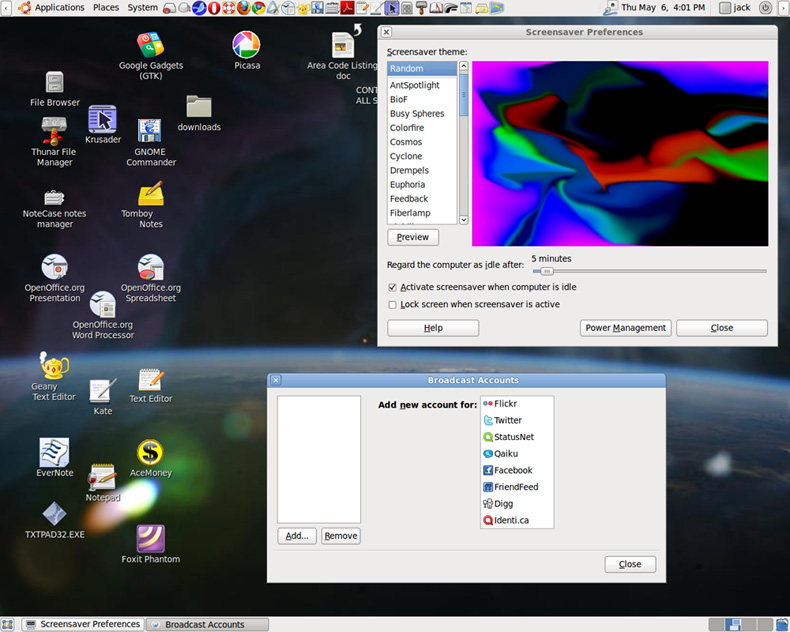
This menu consolidates the process of accessing and updating socialnetworks, including Facebook, Digg, Twitter and Identica. It alsointegrates chat channels so users can talk with friends or colleagueson Google Talk, MSN, IRC and pretty much every other network.
That added feature is there to attract business users and consumersalike who fancy frantic updates and hourly reports on who is doingwhat. But I can live without constantly reading and responding tofellow followers and friends in plain sight of the desktop display. I've also avoided several smartphone choices that pushedsimilar social networking integrations.
If there was no way to avoid that feature, Lucid Lynx would haveforced me to reinstall version 9.04, the previous release.
However, my worries proved unfounded. I have to open the Gwibber SocialClient under the Applications/Internet menu to configure and activatethe social networking desktop component.
This software package is added to version 10.04. You can still add itto a previous Ubuntu version by installing the Gwibber MicrobloggingClient via the Ubuntu Software Center. So the Me Menu of SocialNetworking tasks is not a deal-breaker for us anti-social types.
What Else's New
Do not look for much in the way of more glitz and glitter. Aside froma few cosmetic changes, most of the improvements are found under thehood.
For example, boot speed is much quicker on almost any machine.Getting to the desktop was much faster on my slightly older hardwareclunkers.
Developers paid a lot of attention to enhancing Ubuntu One's enhanceddesktop integration for more efficient access to the online service'sfiles and folders. They added bookmark and contact sharing. This makesthe built-in access to the Ubuntu One cloud much more direct andseamless.
Better Tunes and Package delivery
Lucid Lynx spruced up the Ubuntu Software Center with version 2.0. Theinterface is sleeker. It's easier to recognize Ubuntu-providedsoftware from packages supplied by Canonical's partners.
The Ubuntu One Music Store provides music directly through the defaultmusic player. The store provides the purchase of singles and albumsand allows users to share DRM-free music from one location acrossmultiple computers and devices.
The music store is added in this upgrade through the Rhythmbox 0.12.8music management and player package, However, you must be running LucidLynx to gain access to the music store. On another of my computersthat runs Ubuntu 9.10, the resident Rhythmbox 0.12.5 does not havethe menu option for the Ubuntu One Music Store. It cannot be addedbecause the Software Center and other package managers do not provideRhythmbox 0.12.8.
Lucid Lynx and its link to Rhythmbox 0.12.8 provides off-the-shelfiTunes connectivity. It has support for both MTP (media transferprotocol) portable players and Apple iPods.
Oh No Factor
If you are a seasoned Windows or Linux user, the latest redesign ofthe window box controls could be very annoying to you; if you area Mac user, you will feel right at home.
The position of the maximize/restore, minimize and close button is nowlocated on the left side of the screen. If nothing else, it isextremely annoying, but at least it gives more room for notificationsin the right corner.
There is a work-around, however. An Ubuntu Tweak package is available here.This free software will not only return these buttons to the right, but itwill also carry out some other tweaks for Ubuntu preferences.
Hello Canonical: Put an option for where to place these buttons in thepreferences panel.
Other New Stuff
Ubuntu 10.04 LTS brings with it the Linux kernel 2.6.32 and bettersupport for Nvidia proprietary graphics drivers. Also under the hoodis the latest Gnome desktop environment.
New themes and a new collection of screensaver graphics adds someinteresting eye candy to the Ubuntu desktop as well.
Gone, hopefully for good, is the drab, earthy brown signature style ofthe previous distro. Replacing it is an updated color palette called"Ambience." It is replete with hints of orange and light brown wallpaper.
Panel Play
Say hello to a new panel notification area. The new design is acombined grouping of embedded menus, called "application indicators."
This gets rid of some of the panel clutter. More work was also done onthe messaging indicator menu added in Ubuntu 9.10.
A key addition is PiTiVi. this is a video editing tool that is builton the GStreamer multimedia framework. I haven't used it much, but mylimited hands-on exposure shows that PiTiVi is easy to use.
New Nautilus
I was never a fan of the resident Gnome file manager, Nautilus, inprevious releases. But Nautilus is now a bit better thanks to a splitview mode that makes managing files a lot easier. Turn the twin panelfeature on and off with the F3 key.
Another Nautilus redisign is the removal of the address bar in textmode. But you can quickly restore with Ctrl + L.
No GIMP and Abi and ...
Gone as well in the default installation of Lucid Lynx are the classicGIMP image editor and the Abiword word processor. Of course, you canadd them from the package manager.
I was glad to discover that upgrading from Ubuntu 9.10 did not removeGIMP and other software I added along the way.
Also gone is support for bluetooth, compiz extra, ekiga, gnome-pilot,gnumeric, xsane, and a host of libraries. If you use these apps, seeksupport from the open source community rather than from Canonical.
More Details
The Lucid Lynx install removes 32 packages from version 9.04 and adds207 new packages. It upgrades 1,553 packages.
The total download takes 984 MB. It took about 116 minutes to install.










 Loading ...






















Other than the placement of the maximize, minimize and close buttons, it all good. The order and moving these buttons back to the right is easy.
I’m very happy.
This version is even more polished and appealing.